How to make a YouTube Shorts thumbnail with Claude Code
On YouTube's homepage and on a channel's Shorts tab, a Short shows as a thumbnail before anyone plays it, and since July 2026 creators in the YouTube Partner Program can upload their own instead of picking a frame. A good one starts from the right frame, carries a few words that fit what's said, and still reads when it's cropped and shrunk to a card. This guide follows one real run in which Claude Code made a thumbnail for a 36-second Short with ffmpeg and ImageMagick, in three versions to compare. Each step shows the command, what it printed, and what the tools do.
Published:
What YouTube asks for
YouTube recommends 2160 × 3840 pixels for a Shorts thumbnail: 9:16, like the Short itself, at least 640 pixels tall, as a JPG or PNG. Uploaded on a computer, the file can be up to 50 MB; on mobile, 2 MB. A vertical video with a 16:9 thumbnail gets an automatically made 4:5 one instead.
Uploading your own is new for Shorts. Since July 24, 2026, creators in the YouTube Partner Program can, and YouTube says it will open this to more creators over time. The account also has to be verified, and for now a Shorts thumbnail can only be added in YouTube Studio on a computer. Everyone else picks a frame of the Short: Studio on a computer suggests three, and the YouTube app on a phone lets you pick any frame.
Most Shorts are watched in the Shorts feed, which plays them without a thumbnail. According to YouTube's Creator Insider channel, the thumbnail matters on the homepage and on a channel's Home and Shorts tabs, and it isn't always shown whole: their advice is to keep anything important away from the edges, since what people see across devices is closer to 3 × 2 than to the full 9:16. On a channel's Shorts tab, in a browser window 1,024 pixels wide, each card is 206 × 309 pixels, a 2:3 cut from the middle of the thumbnail. On a 2160 × 3840 thumbnail that keeps y 300 to 3540 and drops 300 pixels at the top and the bottom.
What we're making
One thumbnail for heat.mp4, the 36-second Short made in the guide to turning one long video into several Shorts. It's cut from “Interview on extreme weather with physical geographer Hannah Cloke” by the Royal Society: Hannah Cloke, a professor of hydrology, talks about last summer's 40-degree heat in the UK and why heat kills quietly. The interview is released under CC BY 3.0, which covers a thumbnail made from it too, with the same credit as the Short: the Royal Society, a link to the license, and a note that it was changed.
The goal is three versions from the same frame, so there's something to compare: the title low, the title in the middle, and the frame alone. Each one is checked cropped and shrunk to a card on a channel's Shorts tab, since that's the size people see it at.
Every command, output and image below comes from that run. Nothing in it is specific to this Short: any Short with a face in it works the same way.
What you need
A Mac with Homebrew, Claude Code signed in with your own account, and a folder with the Short in it. Here's what each part does:
- Claude Code: the agent. It looks at the frames, picks one, writes the title and the commands, and checks the results.
- ffmpeg: pulls the candidate frames with its thumbnail filter. ffprobe, which comes with it, reads what's in a file.
- ImageMagick: lays the frames out on one sheet, enlarges the chosen one and draws the title. It's free and open source.
- Anton: a tall, bold font from Google Fonts, under the SIL Open Font License, which lets you use it in anything you make.
- The Short's captions, if you have them. heat.vtt came from Whisper in the long-video guide. With them, Claude Code can tell what's being said at each frame.
Step 1: Install ImageMagick and get a font
Homebrew installs both tools:
brew install ffmpeg imagemagickffmpeg has a filter for text, drawtext, but it's only there when ffmpeg is built with the FreeType font library, and Homebrew's isn't. Counting the filters named drawtext gives none:
ffmpeg -hide_banner -filters | grep -c drawtext0
So ffmpeg pulls the frames and ImageMagick does the drawing. Anton comes from the Google Fonts repository on GitHub, as one 171 KB file, in 0.56 seconds:
curl -L -O https://github.com/google/fonts/raw/main/ofl/anton/Anton-Regular.ttfStep 2: Brief Claude Code
Open Claude Code in the folder. The brief says what makes a good frame and how to check the result, and leaves the picking and the commands to Claude Code:
Claude Code
heat.mp4 is a Short I'm about to post, and heat.vtt is its captions. Make a thumbnail for it: - Pull candidate frames and lay them out on one contact sheet with their times - Pick a frame with the eyes open, the face large, and an expression that fits what's being said - 2160 × 3840 JPG with a short title in a bold font - Three versions: the title low, the title in the middle, and the frame alone - Check each one at the size of a card on a channel's Shorts tab, cropped to 2:3, then tell me how they differ so I can pick one
Claude Code reads images, so it can pick from a contact sheet the way a person would. The captions add what the frames can't show: what's being said when each one was taken.
Step 3: Pull candidate frames
ffprobe first. heat.mp4 is 1080 × 1920 at 25 frames a second, 909 frames in 36.4 seconds:
ffprobe -v error -show_entries stream=codec_name,width,height,r_frame_rate,nb_frames:format=duration -of compact=p=0 heat.mp4codec_name=h264|width=1080|height=1920|r_frame_rate=25/1|nb_frames=909 codec_name=aac|r_frame_rate=0/0|nb_frames=1706 duration=36.400000
ffmpeg's thumbnail filter reads the frames in batches, 50 here, and from each batch keeps the one whose colors are closest to the batch's average. -fps_mode vfr writes only the frames it keeps, without repeating any to hold a steady frame rate, and the log says which ones they were:
mkdir framesffmpeg -hide_banner -i heat.mp4 -vf thumbnail=50 -fps_mode vfr frames/%02d.png 2> thumbs.loggrep selected thumbs.log | head -3[Parsed_thumbnail_0 @ 0x7b0f0024c0] frame id #29 (pts_time=1.200000) selected from a set of 50 images [Parsed_thumbnail_0 @ 0x7b0f0024c0] frame id #16 (pts_time=2.680000) selected from a set of 50 images [Parsed_thumbnail_0 @ 0x7b0f0024c0] frame id #18 (pts_time=4.760000) selected from a set of 50 images
909 frames make 18 batches of 50 and one of 9, so 19 frames, each a full 1080 × 1920 PNG, about one every 2 seconds. It took 0.98 seconds. Closest to the average isn't the same as best: as the next step shows, two of the 19 caught a blink.
Step 4: Lay them out on a contact sheet
The log has each frame's time as pts_time. grep pulls the times out, and awk numbers them to match the file names:
grep -o 'pts_time=[0-9.]*' thumbs.log | cut -d= -f2 | awk '{printf "%02d\t%.2f\n", NR, $1}' > times.tsvhead -3 times.tsv01 1.20 02 2.68 03 4.76
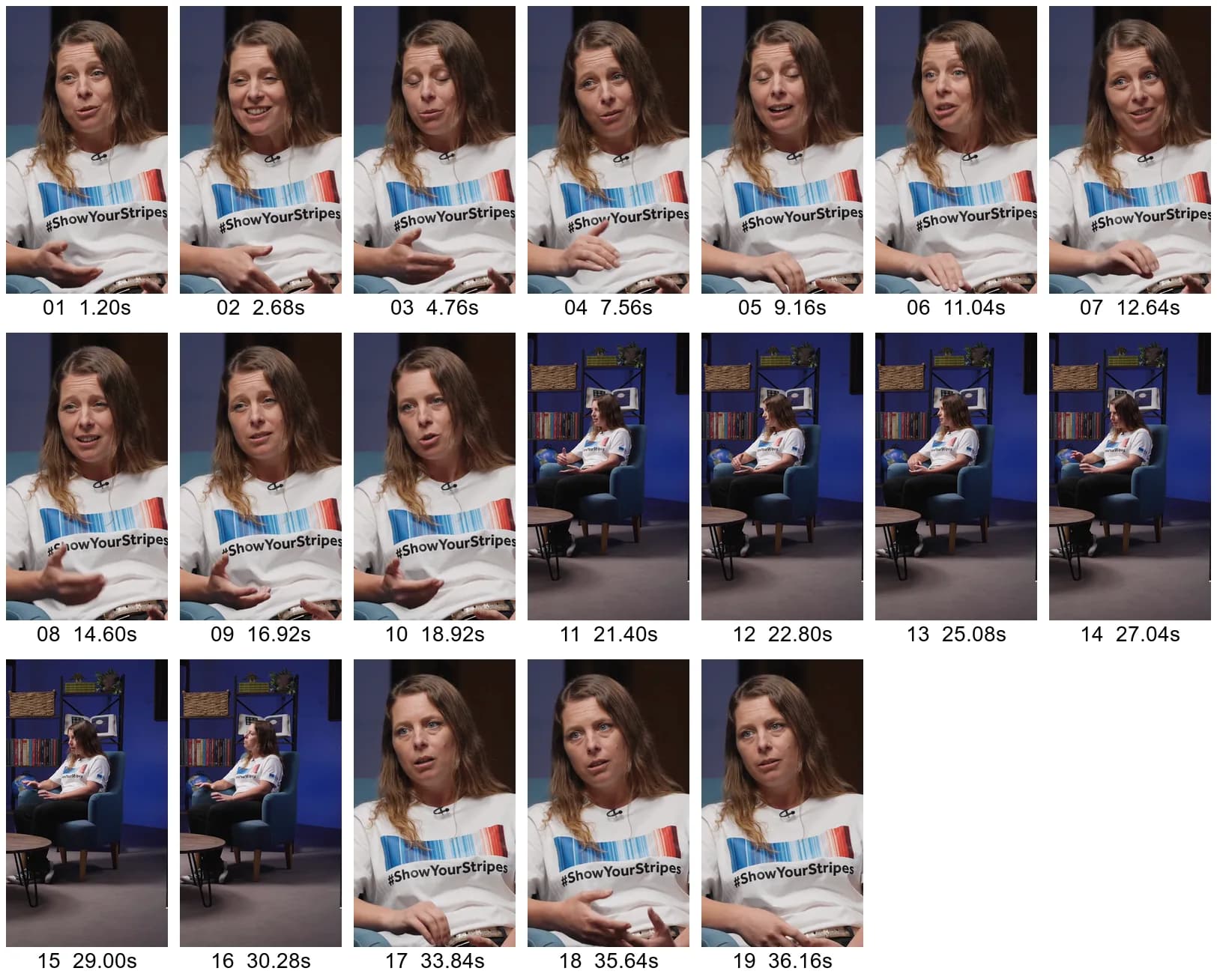
ImageMagick's montage then puts all 19 on one image, each labeled with its number and time:
args=(); while IFS=$'\t' read -r n t; do args+=(-label "$n ${t}s" "frames/$n.png"); done < times.tsvmagick montage "${args[@]}" -tile 7x -geometry 216x384+8+8 -pointsize 28 -background white sheet.pngThe first line builds the arguments from times.tsv: a -label, then the file, for each frame. -tile 7x makes rows of seven, and -geometry 216x384+8+8 shrinks each frame to 216 × 384 with 8 pixels around it. It took 2.02 seconds.
Step 5: Pick the frame
Claude Code went through the sheet and ruled frames out:
- 11 to 16 are the wide shot. Her face takes up a small part of the frame, too small on a 206-pixel card to read her expression.
- 03 and 05 caught her eyes closed, and in 09 they're half down.
- 02 is a smile, which doesn't fit a Short about people dying in a heat wave.
- 17 to 19 are a second close-up from another camera, with her looking off to the side.
Of the rest, frame 10, at 18.92 seconds, has her eyes open, looking almost straight at the camera, with a serious face. The captions show what she's saying at that moment:
grep -A 6 '^00:18.560' heat.vtt00:18.560 --> 00:23.480 inhospitable to live. So heat is a giant killer. It's a silent 00:23.480 --> 00:27.320 killer as well. So it's not like a roaring flood water coming
The title comes from those words: A SILENT KILLER. It's three words, short enough to fit on one line at a size that still reads on a card, and it's her phrase, not one made up for the thumbnail.
Step 6: Render three versions
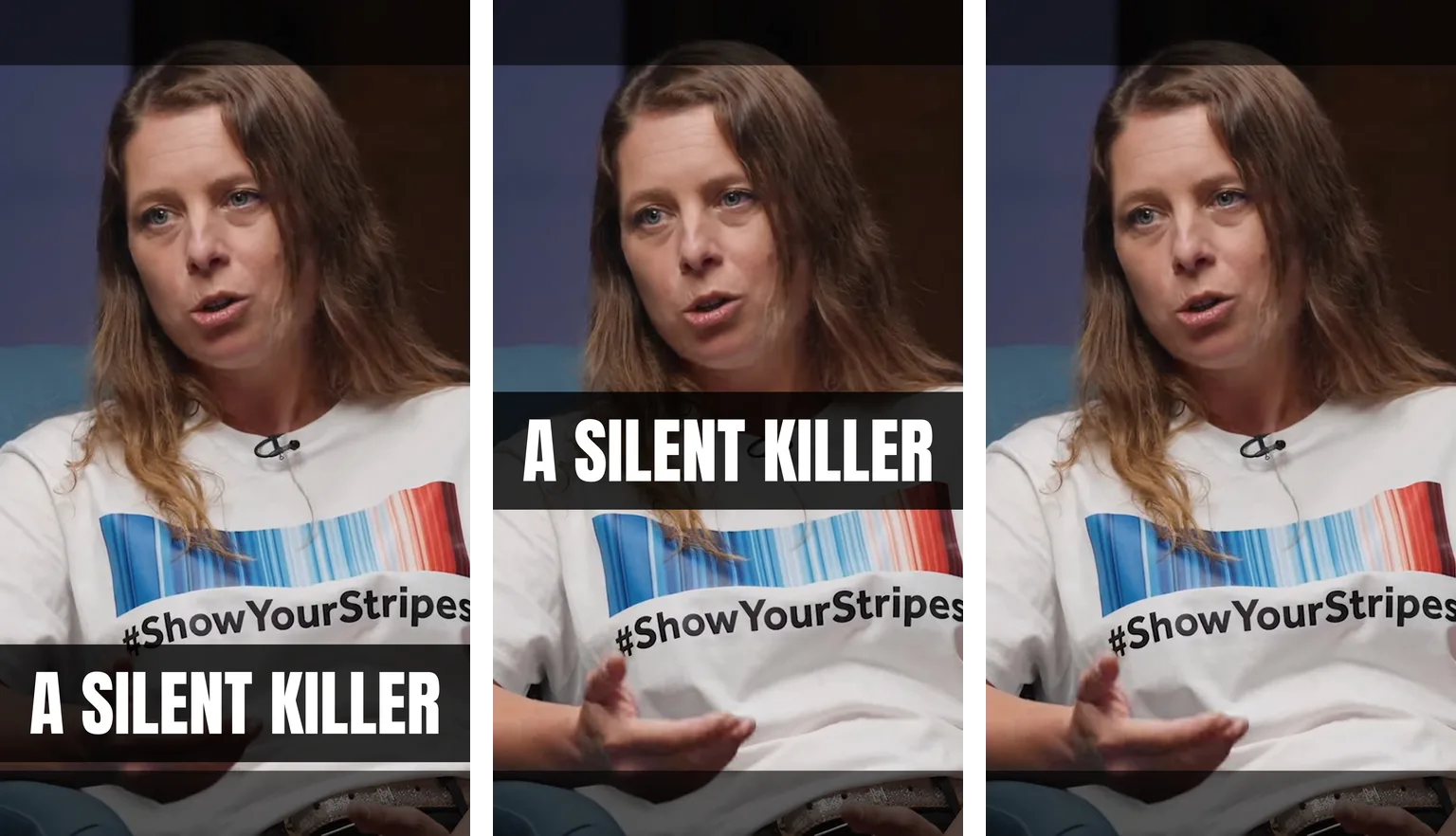
Each command starts from frame 10 and makes one version:
magick frames/10.png -filter Lanczos -resize 2160x3840 \ -fill "rgba(0,0,0,0.8)" -draw "rectangle 0,2960 2160,3500" \ -font Anton-Regular.ttf -pointsize 330 -fill white -gravity center -annotate +0+1310 "A SILENT KILLER" \ -quality 92 a.jpgmagick frames/10.png -filter Lanczos -resize 2160x3840 \ -fill "rgba(0,0,0,0.8)" -draw "rectangle 0,1800 2160,2340" \ -font Anton-Regular.ttf -pointsize 330 -fill white -gravity center -annotate +0+150 "A SILENT KILLER" \ -quality 92 b.jpgmagick frames/10.png -filter Lanczos -resize 2160x3840 -quality 92 c.jpg-filter Lanczos -resize 2160x3840 doubles the 1080 × 1920 frame to the recommended size. That adds no detail, but the title is drawn after it, at full size, so the letters' edges stay sharp.
-draw puts a band of 80% black across the full width, 540 pixels tall: from y 2960 to 3500 in a.jpg, below the #ShowYourStripes on her shirt, and from 1800 to 2340 in b.jpg, across her collar between her face and the stripes. Her T-shirt is white, so white letters need something dark behind them.
-gravity center makes -annotate place the title from the middle of the image, y 1920. +0+1310 puts the title's middle at 3230, the middle of a.jpg's band, and +0+150 puts it at 2070, the middle of b.jpg's. At 330 points, A SILENT KILLER in Anton is 1,890 pixels wide, leaving 135 on each side. c.jpg is the frame alone, the same picture you'd get by picking 18.92 seconds in YouTube's frame picker.
-quality 92 sets the JPG compression. All three took 1.03 seconds, and identify shows their size in pixels and bytes:
magick identify -format '%f %wx%h %b\n' a.jpg b.jpg c.jpga.jpg 2160x3840 755234B b.jpg 2160x3840 738491B c.jpg 2160x3840 769529B
Each is 2160 × 3840 and under 800 KB, inside both the 50 MB limit on a computer and the 2 MB one on mobile.
Step 7: Check them at card size
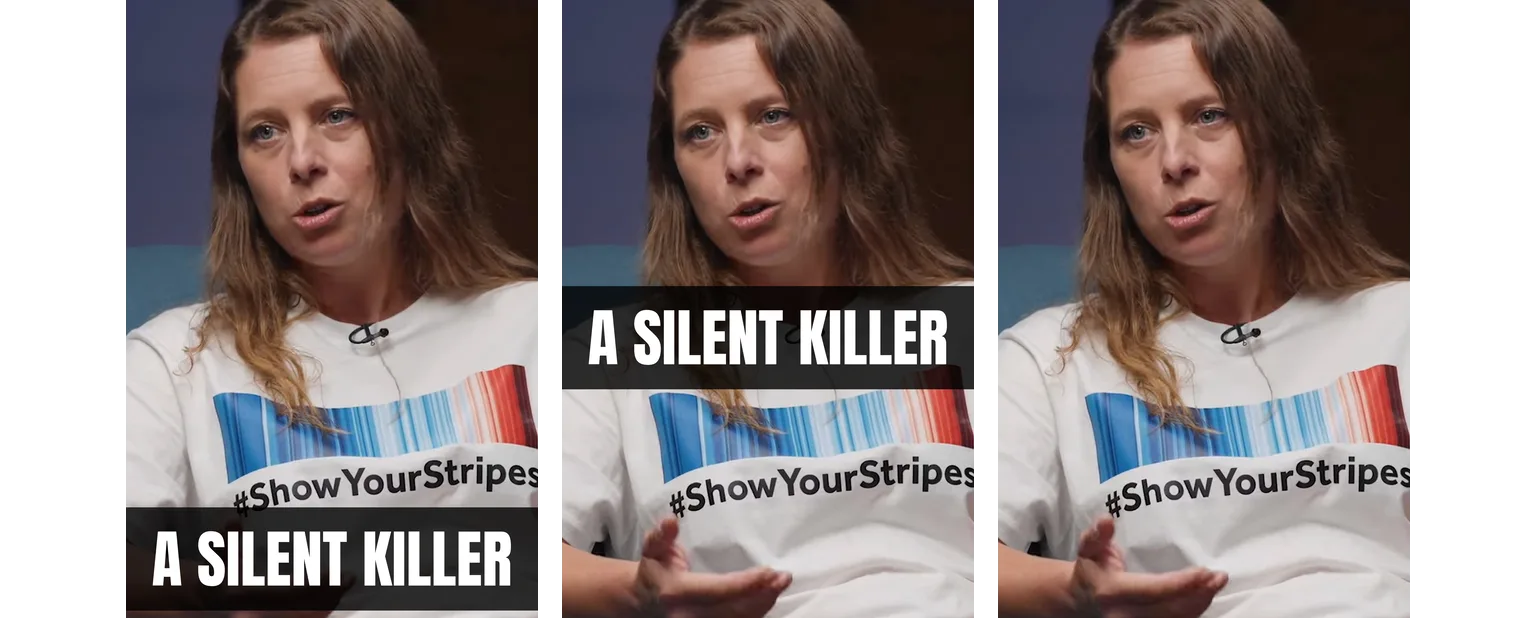
A thumbnail is made at 2160 × 3840 and seen at a fraction of that, so the check crops each version to the middle 2:3 and shrinks it to a card:
for f in a b c; do magick $f.jpg -gravity center -crop 2160x3240+0+0 +repage -resize 206x309 $f-card.pngdonemagick a-card.png -size 12x309 xc:white b-card.png -size 12x309 xc:white c-card.png +append cards.png-gravity center -crop 2160x3240+0+0 keeps the middle 3,240 pixels of height, y 300 to 3540, the part a card shows. +repage drops the crop's offset so the next step sees a plain image, and -resize 206x309 brings it to the card's size. +append sets the three side by side with 12-pixel white gaps. It took 0.52 seconds.
Step 8: Compare and upload
At card size the title still reads in both versions that have one, and in all three the crop cuts off the top of her hair. Otherwise they differ in where the words are:
- a.jpg: the title sits well below her face and covers only her hand and the bottom of her shirt. Its band ends 40 pixels, at full size, above the card's bottom edge, so any tighter crop cuts into it.
- b.jpg: the title is in the middle, nearer her face, and stays in any crop that keeps the middle. Read as a wide band across the middle, Creator Insider's 3 × 2 keeps y 1200 to 2640: b.jpg's title is inside it, and a.jpg's isn't.
- c.jpg: no title. The only words on the card are #ShowYourStripes on her shirt, so it shows who's talking but not about what.
To upload one, open the Short in YouTube Studio on a computer, and below Thumbnail, click Upload file. If you posted the Short from your phone, add the thumbnail afterwards the same way. Without custom thumbnails, c.jpg is the version within reach: in the YouTube app, pick the frame at 18.92 seconds.
Where it gets hard
The commands ran in about 5 seconds in all. The rest took judgment: which face fits what's said, which words go on it and where they sit, each checked on a card less than a tenth as wide as the image. With more Shorts, choosing those and saying what to change on each is most of the work.
Cutfac is a Mac app we make for that part. It runs Claude Code or Codex for each video, lets you select a range or draw a box on the frame and say what to change, and keeps versions side by side to compare and pick from. You can do everything in this guide without it.
Free tools for this
Sources
- YouTube Help: Add custom thumbnails on YouTube
- YouTube Blog: Making thumbnails easier on YouTube
- Creator Insider: New! Shorts Thumbnails, Generative Thumbnails, Communities Features
- Wikimedia Commons: Interview on extreme weather with physical geographer Hannah Cloke – The Royal Society (CC BY 3.0)
- Creative Commons: Attribution 3.0 Unported (CC BY 3.0)
- Claude Code overview
- FFmpeg filters: thumbnail
- Homebrew: imagemagick
- ImageMagick: montage
- ImageMagick: command-line options
- Google Fonts: Anton (SIL Open Font License)
- Pretendard (SIL Open Font License)
Questions
YouTube recommends 2160 × 3840 pixels, 9:16 like the Short, at least 640 pixels tall, as a JPG or PNG. Uploaded on a computer it can be up to 50 MB, on mobile 2 MB. A vertical video with a 16:9 thumbnail gets an automatically made 4:5 one instead.
Creators in the YouTube Partner Program, since July 2026, with a verified account, in YouTube Studio on a computer. YouTube says it will open this to more creators over time. Everyone else picks a frame: Studio on a computer suggests three, and the YouTube app lets you pick any frame.
Not every place shows the full 9:16 image. A card on a channel's Shorts tab shows the middle 2:3, which on a 2160 × 3840 thumbnail leaves out 300 pixels at the top and the bottom. Keep the face and the title away from the edges, and check each version cropped and at card size, as in step 7.
Yes. Open the Short in YouTube Studio on a computer, and below Thumbnail, click Upload file.
Not for now: according to YouTube's Creator Insider channel, testing thumbnails doesn't cover Shorts, at least for now. Compare versions before you upload instead, as in step 8.
Yes, with a font that has its letters. Anton has none for Korean: ImageMagick drew a blank image for a Korean title and printed no error. Pretendard, also under the SIL Open Font License, drew the same title with the same command. Check the result each time, since a missing letter can fail silently.
About 5 seconds of processing in this run: 0.98 seconds to pull 19 frames, 2.02 for the contact sheet, 1.03 to render three versions and 0.52 to check them. Claude Code's looking and picking come on top of that.