How to remove silence and make jump cuts with Claude Code
Cutting the pauses out of someone talking is the most common edit in short videos, and it's a lot of small, fiddly cuts by hand. This guide does it to one minute of an interview: Claude Code finds the pauses with ffmpeg, cuts them out in one pass, makes a tight and a loose version to compare, checks against a transcript that no words went with them, and zooms in on every other piece so the cuts read as changes of framing. Every command, number and frame below comes from that run.
Published:
What we're working with
61 seconds, from 3:06.5 to 4:07.5, of “Interview on extreme weather with physical geographer Hannah Cloke” by the Royal Society, released under CC BY 3.0, which lets you cut it, change it and repost it with credit to the Royal Society, a link to the license, and a note that it was changed. It's 1920 × 1080 at 25 frames per second.
In it, the interviewer asks how good we are at predicting the next flood, and Hannah Cloke answers, mostly in her close-up. She speaks in phrases with short breaths between them, which is what a jump cut takes out: the picture jumps a little at each cut, and the talking runs on without a gap.
Everything ran on a Mac with ffmpeg 9.0.2 and openai-whisper from Homebrew. The commands, outputs and images below are from that run.
What you need
A Mac with Homebrew, Claude Code signed in with your own account, and a folder to work in. Homebrew installs ffmpeg, and whisper for the transcript used in the check:
brew install ffmpeg openai-whisperThe interview comes from Wikimedia Commons, about 10 minutes and 85 MB:
curl -L -o interview.webm "https://upload.wikimedia.org/wikipedia/commons/9/99/Interview_on_extreme_weather_with_physical_geographer_Hannah_Cloke_%E2%80%93_The_Royal_Society.webm"1. Cut the clip
First the part of the interview to work on, encoded again so it starts cleanly on a frame:
Claude Code
Cut interview.webm from 3:06.5 to 4:07.5 into clip.mp4.
ffmpeg -ss 186.5 -to 247.5 -i interview.webm -c:v libx264 -crf 18 -preset medium -pix_fmt yuv420p -c:a aac -b:a 160k -movflags +faststart clip.mp42. Find the pauses
ffmpeg's silencedetect filter listens to the sound and logs where it stays below a level for at least a set time. Before picking the level, Claude Code measured how loud the clip is with volumedetect: an average of -18.0 dB, and the loudest moment at -0.4 dB. Speech that averages -18 dB is well clear of -30 dB, so that was the first try, with pauses of at least 0.3 seconds:
Claude Code
Find the pauses in clip.mp4 where she stops talking, and save them to silence.log.
ffmpeg -nostats -i clip.mp4 -vn -af silencedetect=noise=-30dB:d=0.3 -f null - 2>&1 | grep -o "silence_[a-z]*: [-0-9.]*.*" > silence.loghead -6 silence.logsilence_start: 3.788292 silence_end: 4.501542 | silence_duration: 0.71325 silence_start: 7.405333 silence_end: 8.240604 | silence_duration: 0.835271 silence_start: 13.256687 silence_end: 13.596854 | silence_duration: 0.340167
That found 14 pauses, between 0.31 and 0.84 seconds long, 6.68 seconds in all. The level is the choice that matters most, so Claude Code counted what each one finds:
for n in -25 -30 -35 -40; do echo "$n dB: $(ffmpeg -nostats -i clip.mp4 -vn -af silencedetect=noise=${n}dB:d=0.3 -f null - 2>&1 | grep -c silence_end) pauses"done-25 dB: 17 pauses -30 dB: 14 pauses -35 dB: 6 pauses -40 dB: 4 pauses
Between her phrases the room doesn't go quiet, it drops to about -30 to -45 dB, so at -35 and -40 most of her pauses never count as silence. At -25 dB the soft ends of words start counting too. -30 dB caught her breaths and nothing else. The minimum length works the same way: 0.2 seconds at -30 dB found 19, the extra five being short gaps inside a phrase that shouldn't be cut.
3. Cut them out, tight and loose
Cutting a pause right at its edges clips the breath and the first sound of the next word, so each pause keeps a little on either side. How much is a matter of taste, so Claude Code made two versions: 0.05 seconds kept on each side, and 0.15. The script reads silence.log, works out what to keep, and has ffmpeg cut and join all the pieces in one pass:
Claude Code
Cut the pauses in silence.log out of clip.mp4. Keep 0.05 seconds of each pause on either side as tight.mp4, and 0.15 as loose.mp4.
"""Cut the pauses out of a video, leaving PAD seconds of each pause on either side.Usage: cuts.py clip.mp4 silence.log PAD out.mp4 [ZOOM]With ZOOM, every other piece is enlarged by that much, so the jump at each cut reads as achange of framing."""import reimport subprocessimport syssrc, log, pad, out = sys.argv[1], sys.argv[2], float(sys.argv[3]), sys.argv[4]zoom = float(sys.argv[5]) if len(sys.argv) > 5 else 1.0FPS = 25FADE = 0.01 # a 10 ms fade at each joint so the sound doesn't clickduration = float( subprocess.run( ["ffprobe", "-v", "error", "-show_entries", "format=duration", "-of", "csv=p=0", src], capture_output=True, text=True, check=True, ).stdout)starts = [float(v) for v in re.findall(r"silence_start: ([\d.]+)", open(log).read())]ends = [float(v) for v in re.findall(r"silence_end: ([\d.]+)", open(log).read())]def frame(t): """Round a time to the nearest frame, so picture and sound are cut at the same place.""" return round(t * FPS) / FPS# Keep everything except the middle of each pause that's longer than the padding on both sides.keep, at, cut = [], 0.0, 0for start, end in zip(starts, ends): if end - start <= 2 * pad: continue keep.append((at, frame(start + pad))) at = frame(end - pad) cut += 1keep.append((at, duration))parts, labels = [], ""for i, (a, b) in enumerate(keep): punch = f",crop=iw/{zoom}:ih/{zoom},scale=1920:1080,setsar=1" if zoom > 1 and i % 2 else "" parts.append(f"[0:v]trim={a}:{b},setpts=PTS-STARTPTS{punch}[v{i}]") parts.append( f"[0:a]atrim={a}:{b},asetpts=PTS-STARTPTS," f"afade=t=in:d={FADE},afade=t=out:st={b - a - FADE:.3f}:d={FADE}[a{i}]" ) labels += f"[v{i}][a{i}]"parts.append(f"{labels}concat=n={len(keep)}:v=1:a=1[v][a]")subprocess.run( ["ffmpeg", "-v", "error", "-y", "-i", src, "-filter_complex", ";".join(parts), "-map", "[v]", "-map", "[a]", "-c:v", "libx264", "-crf", "18", "-pix_fmt", "yuv420p", "-c:a", "aac", "-b:a", "160k", "-movflags", "+faststart", out], check=True,)kept = sum(b - a for a, b in keep)print(f"{out}: {cut} pauses cut, {duration:.2f} s -> {kept:.2f} s ({duration - kept:.2f} s shorter)")python3 cuts.py clip.mp4 silence.log 0.05 tight.mp4python3 cuts.py clip.mp4 silence.log 0.15 loose.mp4tight.mp4: 14 pauses cut, 61.04 s -> 55.68 s (5.36 s shorter) loose.mp4: 14 pauses cut, 61.04 s -> 58.56 s (2.48 s shorter)
Each version took about 7 seconds. trim and atrim take the same stretch of picture and sound, and concat joins them in order. Two details keep the result clean: every cut is rounded to a whole frame, so picture and sound are cut at the same place and stay in sync, and each piece of sound fades in and out over 10 milliseconds, so the joints don't click.
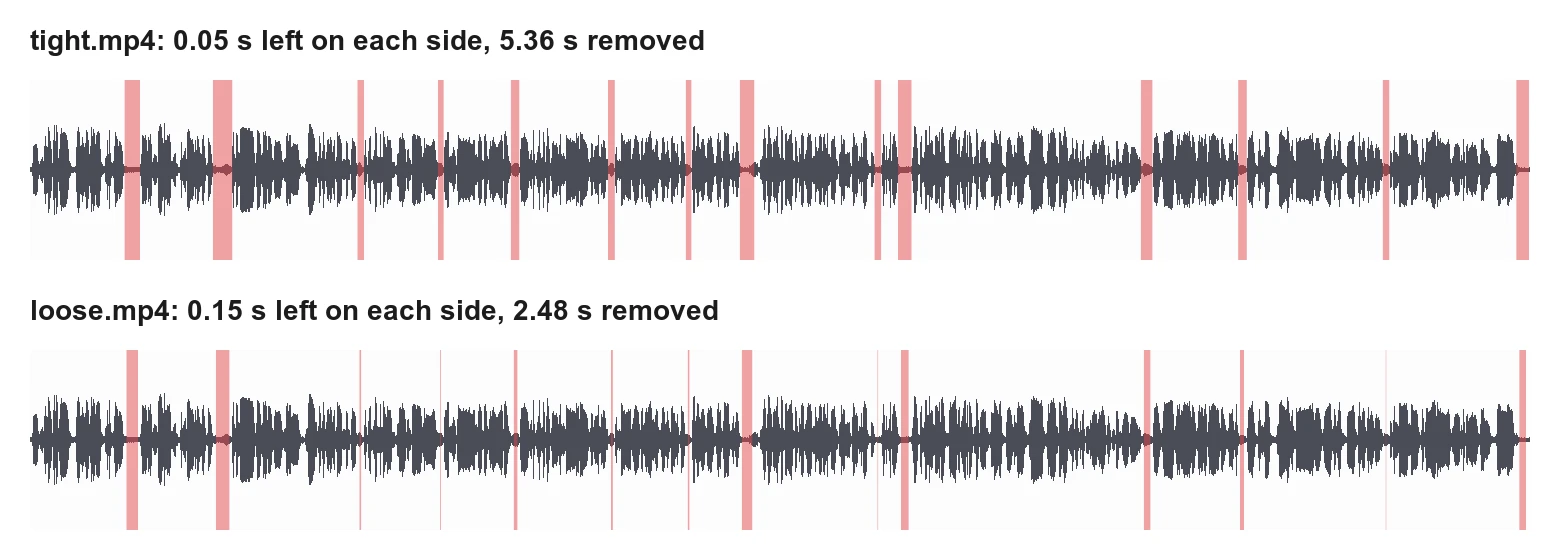
The tight version runs one phrase into the next and feels fast, like most talking-head Shorts. The loose one keeps a short breath and sounds closer to how she actually speaks. Both come from the same log, so making another with a different amount is one more command.
4. Check nothing was lost
Silence detection only knows loud and quiet, so a soft word can fall below the level and be cut with the pause. Claude Code checked two ways. First, whisper transcribed all three files, and the transcripts were compared word by word:
Claude Code
Check that no words went missing in tight.mp4 and loose.mp4.
whisper clip.mp4 tight.mp4 loose.mp4 --language en --output_format txt --output_dir checkfor f in tight loose; do echo "--- $f" diff <(tr -s ' \n' '\n\n' < check/clip.txt) <(tr -s ' \n' '\n\n' < check/$f.txt)done--- tight 52d51 < and 124d122 < yeah 152c150 < um --- > and --- loose 52d51 < and
Each difference was looked up in the clip's timestamps. The “and” at 16.9 seconds and the “yeah” at 37.2 seconds both sit outside anything that was cut, so they're still there; whisper ran them into the words around them. The “um” at 45 seconds is a real change: it was drawn out, its quiet tail was inside a pause, and with the tail cut whisper hears it as “and”. Shortening a drawn-out filler like that is part of what a tight cut is for.
A transcript can miss things too, so the second check measured the loudest moment of each stretch the tight version removes:
"""Print the loudest moment of each stretch cuts.py removes, to check no speech went with it.Usage: peaks.py clip.mp4 silence.log PAD"""import reimport subprocessimport syssrc, log, pad = sys.argv[1], sys.argv[2], float(sys.argv[3])FPS = 25starts = [float(v) for v in re.findall(r"silence_start: ([\d.]+)", open(log).read())]ends = [float(v) for v in re.findall(r"silence_end: ([\d.]+)", open(log).read())]def frame(t): return round(t * FPS) / FPSfor start, end in zip(starts, ends): if end - start <= 2 * pad: continue a, b = frame(start + pad), frame(end - pad) stats = subprocess.run( ["ffmpeg", "-nostats", "-ss", str(a), "-to", str(b), "-i", src, "-vn", "-af", "aformat=channel_layouts=mono,astats", "-f", "null", "-"], capture_output=True, text=True, ).stderr peak = re.findall(r"Peak level dB: ([-\d.]+)", stats)[-1] print(f"{a:5.2f}-{b:5.2f} s peak {float(peak):.1f} dB")python3 peaks.py clip.mp4 silence.log 0.053.84- 4.44 s peak -43.7 dB 7.44- 8.20 s peak -34.6 dB 13.32-13.56 s peak -30.1 dB 16.60-16.80 s peak -31.0 dB 19.56-19.88 s peak -30.4 dB 23.52-23.76 s peak -30.5 dB 26.68-26.88 s peak -34.4 dB 28.88-29.44 s peak -31.6 dB 34.36-34.60 s peak -35.5 dB 35.32-35.84 s peak -39.0 dB 45.20-45.64 s peak -31.4 dB 49.16-49.48 s peak -33.7 dB 55.04-55.28 s peak -32.9 dB 60.48-60.96 s peak -35.4 dB
Nothing removed is louder than -30.1 dB, against speech that averages -18 dB, so what went is breath and room sound. If a stretch had come out near the speech level, that's the place to listen to.
5. Hide the jump with a punch-in
When the shot doesn't change, her head moves a little between the last frame before a cut and the first after it, and that small jump is what gives the jump cut its name. A common way to soften it is to zoom in on every other piece, so each cut looks like a change of framing. The same script does that when given a zoom, here 1.15 times:
python3 cuts.py clip.mp4 silence.log 0.05 punch.mp4 1.15punch.mp4: 14 pauses cut, 61.04 s -> 55.68 s (5.36 s shorter)
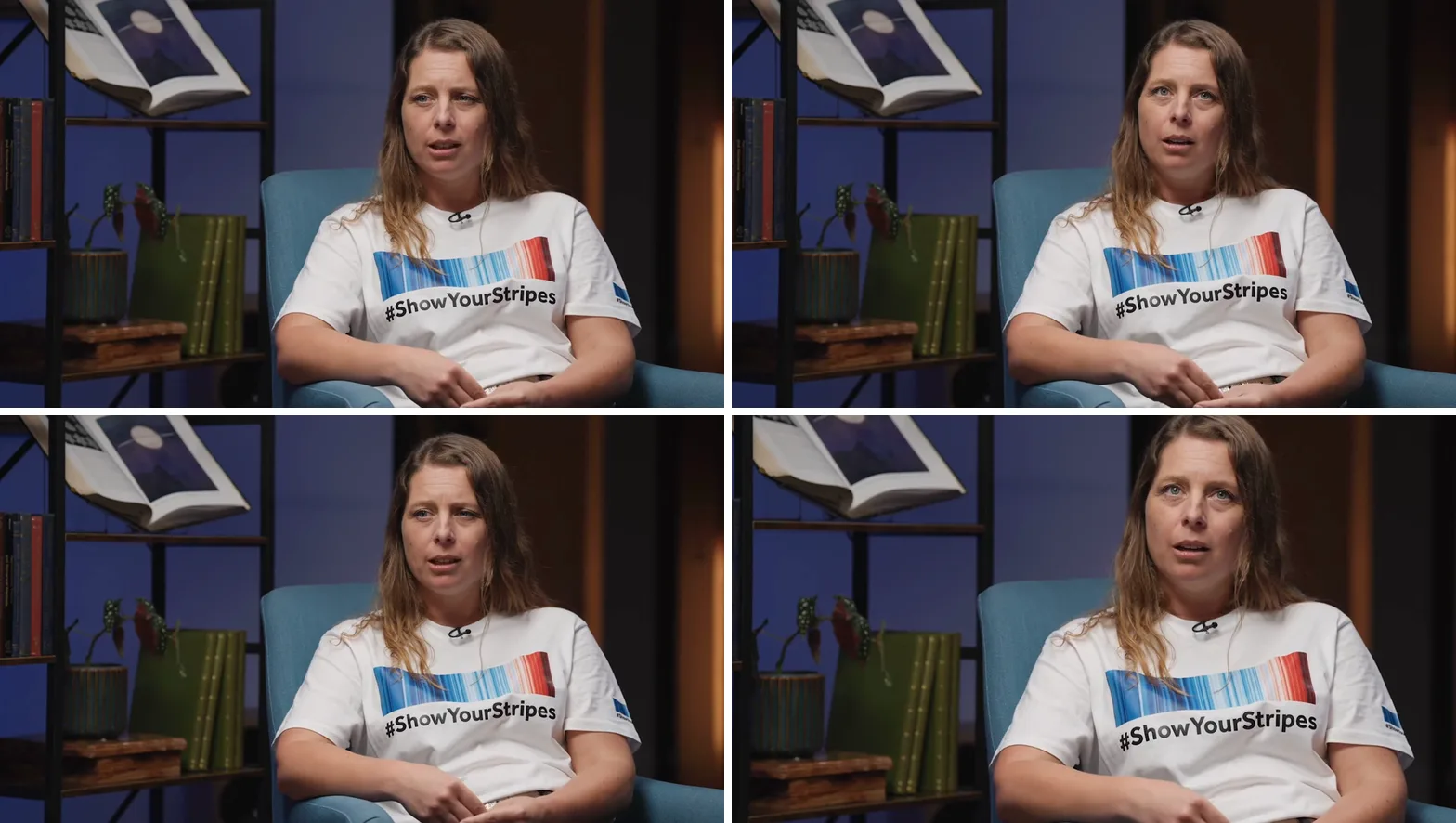
In tight.mp4 her head shifts sideways in a frame that otherwise stays put, which is what catches the eye. In punch.mp4 the whole picture changes size at the same moment, and the shift gets lost in it. A 1.15 times zoom crops about 13% off the width and height and enlarges what's left, so on a 1080p source the closer pieces are a little softer; on a 4K source they wouldn't be.
6. Credit the footage
CC BY asks for the title, the creator, a link to the license, and a note that it was changed. Cutting pauses and zooming in are changes, so say so:
Footage: "Interview on extreme weather with physical geographer Hannah Cloke" by the Royal Society, CC BY 3.0, cut, its pauses shortened, and parts enlargedLicense: https://creativecommons.org/licenses/by/3.0/Where it gets hard
This interview was already edited, so it had few long pauses and the tight cut saved 5.36 seconds of 61. A raw recording, with thinking pauses and false starts, usually has far more to cut. Silence detection only finds quiet, though. At the start the interviewer asks “how good are we and how good are we”, a restart with no pause in it, and only a transcript shows that. The same goes for filler words said at full voice.
The level depends on the recording. A noisy room or music under the voice fills the gaps between phrases, and silence detection finds nothing. Measure first with volumedetect, try a few levels and count what each finds, then check the result against a transcript before posting it.
Cutfac is a Mac app we make for videos like this. It runs Claude Code or Codex for each video, lets you select a range or draw a box on the frame and say what to change, and keeps versions side by side to compare and pick from. You can do everything in this guide without it.
Sources
- Wikimedia Commons: Interview on extreme weather with physical geographer Hannah Cloke – The Royal Society (CC BY 3.0)
- Creative Commons: Attribution 3.0 Unported (CC BY 3.0)
- OpenAI Whisper (MIT license)
- Homebrew: openai-whisper
- Claude Code overview
- Homebrew: ffmpeg
- FFmpeg filters: silencedetect, trim, atrim, afade, concat, crop and astats
Questions
Find the pauses with silencedetect, for example -af silencedetect=noise=-30dB:d=0.3, then keep everything between them with trim for the picture and atrim for the sound, and join the pieces with concat. ffmpeg's silenceremove filter only shortens the sound, so the picture would drift out of sync.
It depends on how loud the speech and the room are. Measure the clip with volumedetect, then count the pauses a few levels find. In this guide speech averaged -18 dB, -30 dB found 14 pauses, and -40 dB found only 4 because the room between phrases sat around -30 to -45 dB.
Enough not to clip the breath and the start of the next word. 0.05 seconds on each side gives the fast, run-on feel of most Shorts; 0.15 seconds keeps a short breath. Make both and pick.
Zoom in on every other piece, here 1.15 times, so each cut reads as a change of framing. Cutting to another shot or covering the joint with other footage works too.
It can, if a word is softer than the threshold. Compare a transcript of the result with one of the original, and measure the loudest moment of each removed stretch. Here nothing removed was louder than -30.1 dB.
Not by itself. Silence detection finds quiet, so a word said at full voice or a phrase said twice stays. Those take a transcript with word timings, so the agent can find the words and cut them.