How to auto-caption a video with Whisper and Claude Code, fix the SRT and translate it
Whisper is OpenAI's open-source speech recognition model. It runs on your own computer and writes what's said in a video as subtitle files, with a time for every line. It gets most words right and some names wrong, and checking and fixing them is work a coding agent does well. This guide follows one real run: a 99.5-second NASA explainer with English narration goes in, and vertical videos with burned-in subtitles in English, Korean and Spanish come out, along with the .srt files. Each step shows the command or code, what it printed, and what Whisper or Remotion does.
Published:
What we're making
The starting point is a NASA explainer from the NASA Image and Video Library, “How Will We Extract Water on the Moon? We Asked a NASA Expert”. In 99.5 seconds of 1920 × 1080 video, a NASA expert explains PRIME-1, a drill and a mass spectrometer headed for the Moon's south pole to look for water. It has English narration and no subtitles.
The goal is subtitles from that narration: an .srt file written by Whisper, with the names it got wrong fixed, translated into Korean and Spanish on the same timings, and burned into a 1080 × 1920 video for each language. The English one is at the top of the page, next to the clip it started from.
Every command, output and frame below comes from that run. Any video with speech works the same way. If you use NASA's, its media guidelines in the sources ask you to credit NASA and not to suggest that NASA endorses your work.
What you need
A Mac with Homebrew, Node.js, Claude Code signed in with your own account, and an empty folder to work in. Here's what each part does:
- Claude Code: the agent. It runs Whisper, compares the subtitles with the script, writes the translations and the Remotion code, and looks at the frames it renders.
- Whisper: OpenAI's speech recognition model, free and open source under the MIT license. It runs on your computer, so the audio isn't uploaded anywhere. The model used here, turbo, is a 1.51 GB download the first time.
- Remotion: a framework that turns React components into MP4 files, used here to draw the subtitles onto the video. It has its own license, not an open-source one: free for individuals, non-profits and for-profit companies of up to three employees, while larger companies need a company license.
- Remotion Agent Skills: instructions that teach Claude Code how to write Remotion code. They install into the project folder.
- Pretendard Bold (Pretendard-Bold.otf, saved in the folder): the subtitle font, free under the SIL Open Font License. It has Korean and Latin letters, so one font covers all three languages.
Step 1: Install Whisper and get the clip
Homebrew's openai-whisper formula installs Whisper with everything it needs, including ffmpeg to read the audio and PyTorch to run the model. PyTorch is the big part, at 533.6 MB:
brew install openai-whisperNASA's library serves each video in several sizes, and this one also has its script as a file. The ~large.mp4 version is the full 1920 × 1080 video with sound:
url="https://images-assets.nasa.gov/video/How%20Will%20We%20Extract%20Water%20on%20the%20Moon_%20-%20Horizontal%20Video/How%20Will%20We%20Extract%20Water%20on%20the%20Moon_%20-%20Horizontal%20Video"curl -L -o water.mp4 "$url~large.mp4"curl -L -o script.srt "$url.srt"ffprobe, which comes with ffmpeg, shows what's in the file: stereo AAC audio at 48 kHz, H.264 video at 1920 × 1080 and 30 fps, 99.5 seconds long.
ffprobe -v error -show_entries stream=codec_type,codec_name,width,height,r_frame_rate,sample_rate,channels:format=duration,size -of compact water.mp4stream|codec_name=aac|codec_type=audio|sample_rate=48000|channels=2|r_frame_rate=0/0 stream|codec_name=h264|codec_type=video|width=1920|height=1080|r_frame_rate=30/1 format|duration=99.541000|size=62716240
The script ends in .srt, but it isn't subtitles. There isn't one timing line in it, only the title and the narration as one paragraph. It's still useful: it spells the names the way NASA does, and step 5 checks Whisper's output against it.
grep -c -- '-->' script.srthead -c 180 script.srt0 How will we extract water on the Moon? NASA's Artemis missions will establish the first long-term human presence on the lunar surface. Living and working on the lunar surface will
Step 2: Brief Claude Code
Open Claude Code in the folder. The brief says what the subtitles must look like and what to check them against, and leaves the how to Claude Code:
Claude Code
water.mp4 is a 99.5-second NASA explainer with English narration. Make subtitles for it: - Transcribe it with Whisper into en.srt, at most two lines of 32 characters per cue - script.srt is NASA's script, with no timings: check names and spellings against it, and change only the text, never the times - Translate en.srt into Korean (ko.srt) and Spanish (es.srt) on exactly the same cue times - Burn each language into a 1080 × 1920 video with Remotion: the title at the top, the clip in the middle, the subtitles below it, in Pretendard-Bold.otf - Render each one and show me a frame
A vertical video gives the subtitles the width of a phone, so the lines have to be short. And with the times fixed, all three languages share one set of timings: the English file gets corrected once, and the translations follow it.
Step 3: Run Whisper and read what it wrote
Claude Code started with Whisper's defaults and two options. --language en skips detecting the language, and --word_timestamps True records when each word is said, which the options in step 4 need:
whisper water.mp4 --language en --word_timestamps True --output_dir subs[00:21.980 --> 00:27.800] Experiment 1, or PRIME 1, will be deployed to the lunar south pole by our commercial lunar lander [00:27.800 --> 00:34.640] partner intuitive machines. PRIME 1 is intended to drill for water on the lunar surface. PRIME 1 is the [00:34.640 --> 00:39.680] combination of two instruments, a drill built by Honey Bee Robotics called Triton, which stands for [00:39.680 --> 00:45.220] the Regolith Ice Drill for Exploring New Terrain, and the Mass Spectrometer Observing Lunar Operations, [00:45.280 --> 00:50.020] or MSOLO, which is a commercially available mass spectrometer from our industry partner, Inficon,
The run took 3 minutes 28 seconds, 2 minutes 21 of them downloading the model. While it works, Whisper prints each segment with its time; the lines above are 22 to 50 seconds in. On a Mac it runs on the CPU and warns that FP16 isn't supported there, so it uses FP32 instead, which only means slower math.
It writes the transcript in five formats. .srt is the common one for subtitles, and the one YouTube takes:
ls subshead -9 subs/water.srtwater.json water.srt water.tsv water.txt water.vtt 1 00:00:05,500 --> 00:00:10,940 NASA's Artemis missions will establish the first long-term human presence on the lunar surface. 2 00:00:11,340 --> 00:00:15,560 Living and working on the lunar surface will require using resources that are already present 3
Two problems. The cues are whole sentences, 17 of them, with lines up to 103 characters, far more than fits under a vertical video. And names are wrong: Honey Bee Robotics, Triton for TRIDENT, MSOLO for MSolo, Inficon for INFICON, intuitive machines in lower case, PRIME 1 without its hyphen, VIPR for VIPER and the moon for the Moon.
Step 4: Shorter lines, with the names as a hint
Three more options. --max_line_width 32 and --max_line_count 2 split the cues into lines of at most 32 characters, two lines to a cue. --initial_prompt gives Whisper text to treat as what came before, so putting the names there makes it likelier to spell them that way:
whisper water.mp4 --language en --word_timestamps True \ --max_line_width 32 --max_line_count 2 \ --initial_prompt "PRIME-1, TRIDENT, MSolo, INFICON, Honeybee Robotics, Intuitive Machines, VIPER, the Moon" \ --output_dir subs2grep -c -- '-->' subs2/water.srt[01:19.860 --> 01:22.080] So how will we extract water on the moon? [01:22.300 --> 01:32.920] The PRIME-1 mission will set the foundation for future resource utilization on the moon, a key component for the success of upcoming Artemis missions, as well as expanding human exploration of our solar system. [01:32.920 --> 01:35.780] I'll be sure to interact, start looking for a On-site onde beautiful butterflies are. ... 37
37 short cues, and PRIME-1 has its hyphen. But the narration ends at 1:32.9, the clip runs on with music, and over the music Whisper wrote 12 lines nobody says. The first one is above. Whisper has an option for this: --hallucination_silence_threshold 2 skips silent stretches longer than 2 seconds when a segment looks made up. Like the line options, it needs --word_timestamps True:
whisper water.mp4 --language en --word_timestamps True \ --max_line_width 32 --max_line_count 2 \ --initial_prompt "PRIME-1, TRIDENT, MSolo, INFICON, Honeybee Robotics, Intuitive Machines, VIPER, the Moon" \ --hallucination_silence_threshold 2 --output_dir short[01:09.320 --> 01:19.520] The objective of PRIME-1 is to inform NASA's plans for mining resources on the lunar surface, as well as mission operations for a future NASA lunar rover mission called VIPR. [01:19.920 --> 01:22.080] So how will we extract water on the moon? [01:22.300 --> 01:32.920] The PRIME-1 mission will set the foundation for future resource utilization on the moon, a key component for the success of upcoming Artemis missions, as well as expanding human exploration of our solar system. [01:32.920 --> 01:34.380] Thank you. [01:34.500 --> 01:34.860] Thank you. [01:35.340 --> 01:35.920] Thank you.
With the model already downloaded, this run took 1 minute 23 seconds and made 28 cues. The made-up lines are gone, except three “Thank you.” lines at the very end. The log shows whole segments; the line options only shape the files:
head -9 short/water.srt1 00:00:05,500 --> 00:00:09,060 NASA's Artemis missions will establish the first long-term 2 00:00:09,060 --> 00:00:12,580 human presence on the lunar surface. Living and working on
The hint fixed some names, Honeybee Robotics, Intuitive Machines and INFICON, but not all of them. Whisper's help says the prompt is for the first window, its first 30 seconds of audio. Later windows go by the transcript so far, and the hint wears off: TRIDENT came out as TRITENT, MSolo as MSOLO, and VIPER and the Moon as VIPR and moon again.
Step 5: Fix the text against the script
Claude Code compared the cues with script.srt and wrote the corrections as a short Python script, fix_en.py. Each fix names its cue and the exact text to replace, and the script stops with an error if that text isn't there exactly once, so a fix can't land in the wrong place:
# cue number -> (old text, new text); each old text must appear exactly once in that cueFIXES = { 5: ("Experiment", "Experiment-1,"), 6: ("1, or PRIME-1, will be deployed", "or PRIME-1, will be deployed"), 10: ("TRITENT", "TRIDENT"), 12: ("MSOLO", "MSolo"), 15: ("TRITENT", "TRIDENT"), 18: ("MSOLO", "MSolo"), 21: ("of PRIME\n-1 is", "of PRIME-1\nis"), 23: ("VIPR.", "VIPER."), 24: ("moon?", "Moon?"), 26: ("moon,", "Moon,"), # Whisper wrote "Thank you." three times over the closing music 28: ("system. Thank you. Thank you.\nThank you.", "system."),}for n, (old, new) in FIXES.items(): text = cues[n - 1][2] assert text.count(old) == 1, (n, old, text) cues[n - 1][2] = text.replace(old, new)# The last cue now ends with "system.", which water.json puts at 92.48-92.92 s.# Keep it on screen one more second so it can be read.assert cues[27][1] == "00:01:32,480 --> 00:01:35,920"cues[27][1] = "00:01:32,480 --> 00:01:33,920"Three fixes move words instead of spelling them. Cues 5 and 6 bring “1,” back to “Experiment”, which Whisper had split across two cues, and cue 21 puts “PRIME-1” back on one line after the line splitter broke it at its hyphen. The last fix removes the three “Thank you.” lines. Its cue ended with them at 1:35.9, so it now ends a second after its last word, the one time that changed.
python3 fix_en.py short/water.srt en.srten.srt 28 cues
A word diff between Whisper's file and the fixed one shows only what changed, and a diff of the timing lines confirms that one time moved and no other:
git diff --no-index --word-diff=plain short/water.srt en.srt | grep -E '\[-|\{\+'Resources Ice Mining [-Experiment-]{+Experiment-1,+}
[-1,-]or PRIME-1, will be deployed
[-TRITENT,-]{+TRIDENT,+} which stands for the
Operations, or [-MSOLO,-]{+MSolo,+} which is a
harsh space environment. [-TRITENT-]{+TRIDENT+}
surface. [-MSOLO-]{+MSolo+} will then
samples. The objective of [-PRIME-]
[--1-]{+PRIME-1+}
lunar rover mission called [-VIPR.-]{+VIPER.+}
the [-moon?-]{+Moon?+} The PRIME-1 mission
the [-moon,-]{+Moon,+} a key component for
00:01:32,480 --> [-00:01:35,920-]{+00:01:33,920+}
system.[-Thank you. Thank you.-]
[-Thank you.-]diff <(grep -- '-->' short/water.srt) <(grep -- '-->' en.srt)28c28 < 00:01:32,480 --> 00:01:35,920 --- > 00:01:32,480 --> 00:01:33,920
On the frame, the mistake is hard to miss. At 37 seconds NASA's own animation labels the drill TRIDENT, right above the subtitle. Here's that frame before and after, rendered as in step 7:
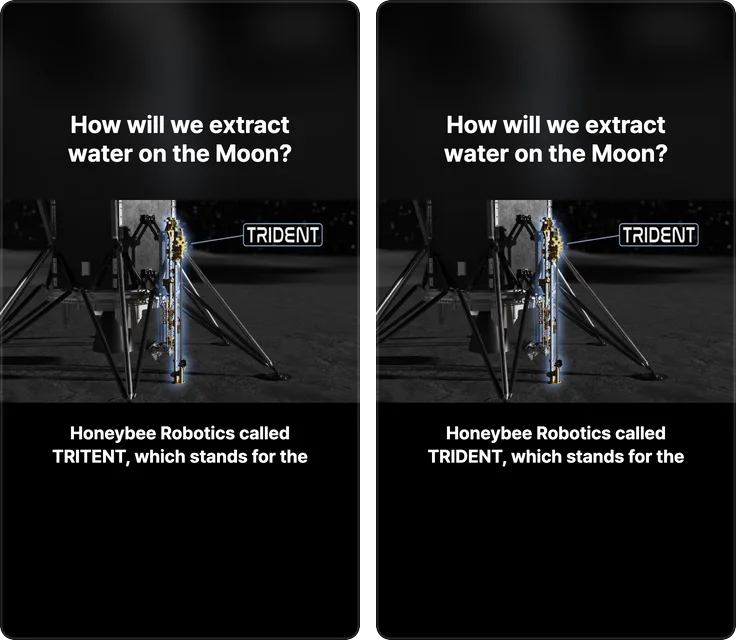
Step 6: Translate on the same timings
Whisper can translate as well, with --task translate, but only into English. For Korean and Spanish, Claude Code translated the 28 fixed cues itself and wrote the files with translate.py, which takes every time from en.srt and supplies only the text:
# times: the "start --> end" line of every cue in en.srtKO = [ "NASA의 아르테미스 임무는\n달 표면에 처음으로", "인류가 오래 머무는\n시대를 엽니다.", # ... one entry per cue, 28 in all]for lang, texts in (("ko", KO), ("es", ES)): assert len(texts) == len(times), (lang, len(texts)) cues = [f"{i + 1}\n{t}\n{x}" for i, (t, x) in enumerate(zip(times, texts))] (run / f"{lang}.srt").write_text("\n\n".join(cues) + "\n\n", encoding="utf-8")The translation goes cue by cue, not sentence by sentence, so each cue still matches what's said while it's on screen. Korean orders a sentence differently, so some Korean cues say their part in other words, as cue 10 below does. The script prints the longest line in each language to check against the limit:
python3 translate.py .ko.srt 28 cues, longest line: 19 "질량 분석기', 줄여서 MSolo." es.srt 28 cues, longest line: 32 'trabajar en la Luna exigirá usar'
Then cue 10, the TRIDENT one, from all three files, and the timing lines of each translation compared with English. diff prints nothing when they match:
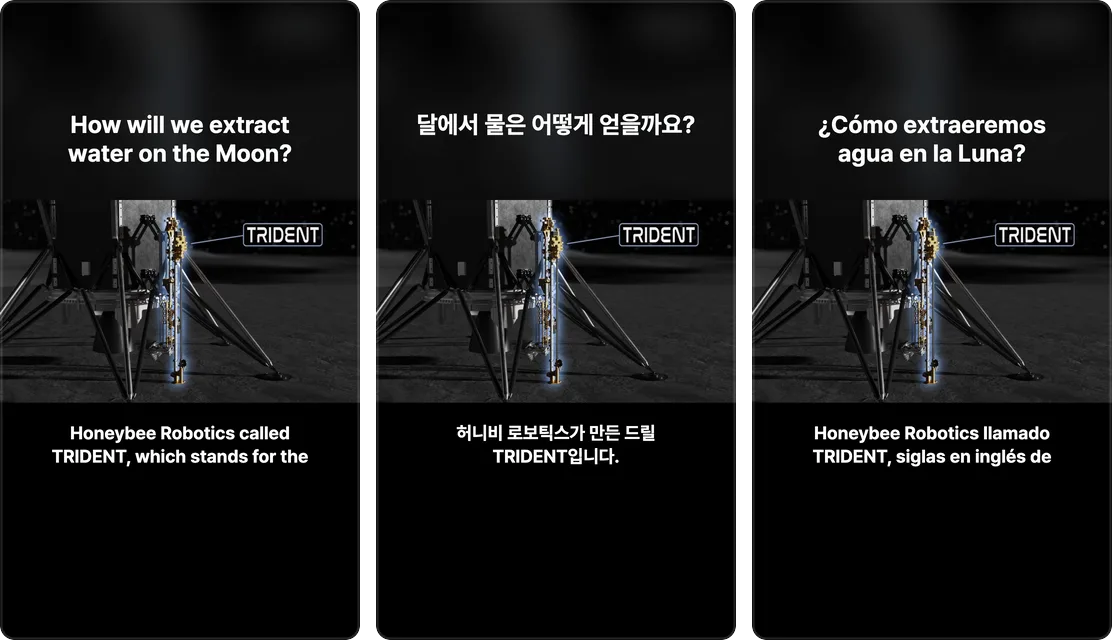
for lang in en ko es; do sed -n 46,49p $lang.srt; donefor lang in ko es; do diff <(grep -- '-->' en.srt) <(grep -- '-->' $lang.srt) && echo same timings; done10 00:00:37,220 --> 00:00:39,860 Honeybee Robotics called TRIDENT, which stands for the 10 00:00:37,220 --> 00:00:39,860 허니비 로보틱스가 만든 드릴 TRIDENT입니다. 10 00:00:37,220 --> 00:00:39,860 Honeybee Robotics llamado TRIDENT, siglas en inglés de same timings same timings
Treat an agent's translation as a draft. Before you post it, have someone who reads the language check it, or at least check the names and numbers.
Step 7: Burn the subtitles in
Burning in means drawing the subtitles into the picture, so they show wherever the video goes. ffmpeg has a subtitles filter for that, but Homebrew's ffmpeg is built without it:
ffmpeg -hide_banner -i water.mp4 -vf "subtitles=filename=en.srt" -t 1 -f null -[AVFilterGraph @ 0x7752c64480] No such filter: 'subtitles' Error opening output file -. Error opening output files: Filter not found
Remotion does it in code instead, which also leaves room for a title and a layout. Its project starter makes an empty project; --blank skips the example animations and --yes accepts the defaults:
npx create-video@latest --yes --blank moon-subscd moon-subsNext, the Agent Skills. The skills command copies 12 skill folders into .claude/skills, where Claude Code picks them up the next time it starts in this folder:
npx skills add remotion-dev/skills -a claude-code -yls .claude/skillsremotion-best-practices remotion-docs remotion-markup remotion-saas remotion-captions remotion-interactivity remotion-multimedia remotion-studio remotion-create remotion-maps remotion-render remotion-upgrade
Last, two packages and the files:
npx remotion add @remotion/captions @remotion/mediacp ../water.mp4 ../en.srt ../ko.srt ../es.srt ../Pretendard-Bold.otf public/@remotion/captions has parseSrt(), which reads an .srt into a list of cues with start and end times in milliseconds, and @remotion/media plays the clip inside the video. Claude Code read the file in calculateMetadata(), which runs once before rendering, and passed the cues in as props. Each frame then finds the cue its time falls in:
// Read the .srt once, before rendering, and pass its cues in as props.export const calculateMetadata: CalculateMetadataFunction<SubtitledProps> = async ({ props }) => { const srt = await fetch(staticFile(props.subs)).then((res) => res.text()); const { captions } = parseSrt({ input: srt }); return { props: { ...props, captions } };};// ...export const Subtitled: React.FC<SubtitledProps> = ({ title, captions = [] }) => { const frame = useCurrentFrame(); const { fps } = useVideoConfig(); const nowMs = (frame / fps) * 1000; const cue = captions.find((c) => nowMs >= c.startMs && nowMs < c.endMs);The layout is the clip at full width in the middle of the 1080 × 1920 frame, the same clip blurred and darkened behind it to fill the rest, the title above and the subtitle below. whiteSpace: "pre-line" keeps Whisper's two lines, and wordBreak: "keep-all" stops the browser from breaking Korean words between letters:
const textStyle: React.CSSProperties = { fontFamily: "Pretendard", color: "white", textAlign: "center", wordBreak: "keep-all", textWrap: "balance",};// ...{cue ? ( <div style={{ ...textStyle, position: "absolute", top: VIDEO_TOP + VIDEO_HEIGHT + 56, left: 40, right: 40, fontSize: 54, lineHeight: 1.3, whiteSpace: "pre-line", }} > {cue.text} </div>) : null}remotion still renders a single frame as an image, which is how Claude Code checks its work; it took about 2 seconds here. Frame 600, 20 seconds in, showed a problem the fix in step 5 had made:
npx remotion still Subtitled out/check.png --frame=600 --props='{"subs":"en.srt","title":"How will we extract water on the Moon?"}'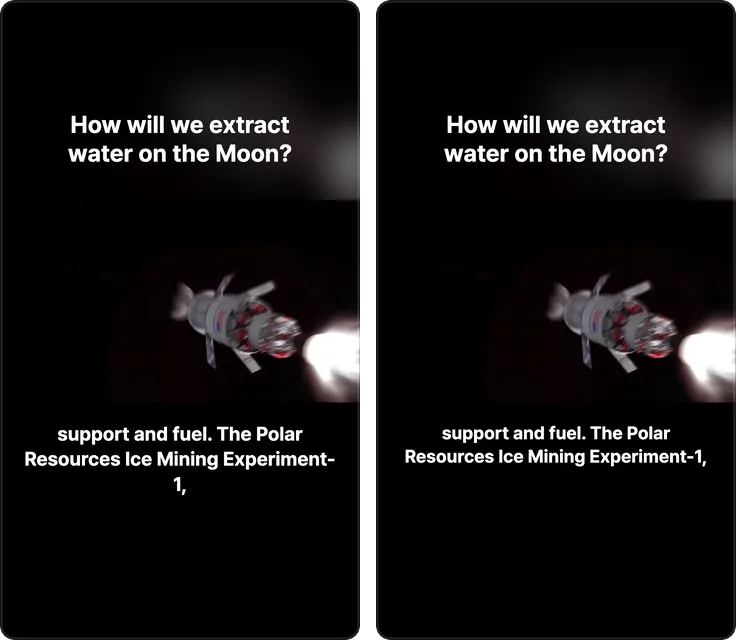
Joining “Experiment-1,” made that line 34 characters, past the 32 Whisper kept to, and at 58 pixels with 60-pixel margins the browser moved “1,” onto a third line. Claude Code set the subtitle to 54 pixels with 40-pixel margins, so the longest lines fit: that one and the 32-character Spanish one.
Step 8: Render every language and compare
One render per language, with --props picking the .srt and the title:
npx remotion render Subtitled out/en.mp4 --props='{"subs":"en.srt","title":"How will we extract water on the Moon?"}'npx remotion render Subtitled out/ko.mp4 --props='{"subs":"ko.srt","title":"달에서 물은 어떻게 얻을까요?"}'npx remotion render Subtitled out/es.mp4 --props='{"subs":"es.srt","title":"¿Cómo extraeremos agua en la Luna?"}'Encoded 2987/2987 + out/en.mp4 42 MB
Each render took about 2.5 minutes on the Mac used here, for 2,987 frames: 99.5 seconds at 30 fps. The English and Spanish videos are 42 MB and the Korean one 41.6 MB. Here's the same moment from each, at 39 seconds:
The .srt files are useful on their own, too. For a horizontal video you'd rather not re-render, YouTube takes them as subtitles viewers can turn on and off: in YouTube Studio, open Subtitles, pick the video, choose Add language and upload the file for it.
Where it gets hard
Each fix here started from a moment: TRITENT at 37 seconds, a line breaking at 20. Finding them meant reading a diff, picking frames and rendering stills, and with three languages every moment is three places to check. With more videos, finding the moment and saying what's wrong with it is most of the work.
Cutfac is a Mac app we make for that part. It runs Claude Code or Codex for each video, lets you select a range or draw a box on the frame and say what to change, and keeps versions side by side to compare and pick from. You can do everything in this guide without it.
Free tools for this
Sources
- NASA Image and Video Library: How Will We Extract Water on the Moon? We Asked a NASA Expert
- NASA: Guidelines for using NASA images and media
- OpenAI Whisper (MIT license)
- Homebrew: openai-whisper
- Claude Code overview
- Remotion: parseSrt()
- Remotion: calculateMetadata()
- Remotion: Agent Skills
- Remotion license
- YouTube Help: Supported subtitle and closed caption files
- YouTube Help: Add subtitles & captions
- Pretendard font (SIL Open Font License)
Questions
Yes. Whisper is open source under the MIT license and runs on your own computer, so there's no charge per minute and the audio stays on your machine. The turbo model is a 1.51 GB download the first time; after that, the 99.5-second clip here took under a minute and a half on a Mac's CPU.
Check the names against anything else that has them, such as text on screen, the video's description or the speaker's own site. For a word you can't confirm, water.json lists when every word was said, so you can jump to that moment and listen.
Only into English: --task translate turns speech in another language into English text. For any other language, translate the .srt afterwards, cue by cue on the same timings, as in step 6.
Partly. It repeats the initial prompt in every window instead of only the first. In this run it got VIPER and the Moon right but still wrote TRITENT and MSOLO twice each, took about twice as long, and added a line nobody says, “We'll be right back.” Checking against the script was still needed.
Burn them in when the subtitles should look a set way and show wherever the video is posted. Upload the .srt where the platform takes one, as YouTube does, when viewers should be able to turn subtitles off or choose a language. The same .srt works for both.