How to make an app promo Short from a screen recording with Claude Code
A screen recording shows everything an app does, at the speed it does it, on a wide screen. A promo Short needs the opposite: a few seconds per step, cropped close enough to read on a phone, with a line of text saying what's happening and a last frame that says where to get it. That's a lot of cropping, timing and text to get right by hand, and it's the kind of work Claude Code does well with ffmpeg once you tell it which moments matter. This guide takes one real recording and turns it into a 23-second vertical promo, with every command Claude Code ran and what each part does.
Published:
What we're working with
The app in the recording is Cutfac, the Mac app we make, because it's the app we can record end to end; the steps are the same for any app. In it, one task from start to finish: a box is drawn on a Short, a request is typed for a big title in that box, Claude Code makes two versions, they're compared side by side, and one is kept. The run between the request and the two versions took about 6 minutes, and the recording holds all of it.
The Short being edited is likely.mp4 from the guide to turning one long video into several Shorts. It's cut from “Interview on extreme weather with physical geographer Hannah Cloke” by the Royal Society, released under CC BY 3.0. The promo shows that footage, so posting it needs the same credit: the Royal Society, a link to the license, and a note that it was changed.
Here Claude Code drove the app in a browser and saved the browser's frames, then joined them into a 30 frames a second video, because that gives a sharp, steady recording. On a Mac, Shift-Command-5 records the screen to a .mov file that works the same way in every step below. Every command, output and frame below comes from that run, with ffmpeg 9.0.2 and ImageMagick 7.1.2 from Homebrew.
What you need
A Mac with Homebrew, Claude Code signed in with your own account, and a folder with the recording in it, here screen.mp4. Homebrew installs ffmpeg for the video and ImageMagick for the text:
brew install ffmpeg imagemagickImageMagick is there because Homebrew's ffmpeg has no drawtext filter, the one that writes text on video. The check prints how many filters match:
ffmpeg -hide_banner -filters | grep -c drawtext0
So the captions are made as transparent images and laid over the video. The font is Arial Bold, which comes with macOS; any font file you're allowed to use works.
1. Find the moments
Start by telling Claude Code what the promo should show, and ask it to look at the recording first:
Claude Code
screen.mp4 is a recording of our app. Make a vertical promo Short under 30 seconds that shows: drawing a box on the video, typing what should change, the agent making two versions, comparing them, and keeping one. Look at the recording first and tell me the times of each moment.
ffprobe -v error -show_entries stream=codec_name,width,height,r_frame_rate,pix_fmt:format=duration -of compact=p=0 screen.mp4codec_name=h264|width=2880|height=1800|pix_fmt=yuvj420p|r_frame_rate=30/1 duration=409.733333
2880 × 1800 is a 1440 × 900 window at twice the pixels, as on a Retina screen, so there's room to crop in close. yuvj420p is the full-range color that JPEG uses, since the frames came from the browser as JPEGs; that matters at the end, when the parts are joined. Then a contact sheet, one frame every 35 seconds, three to a row, in 5.2 seconds:
ffmpeg -v error -y -i screen.mp4 -vf "fps=1/35,scale=512:-1,tile=3x4:padding=12:color=white" -frames:v 1 sheet.png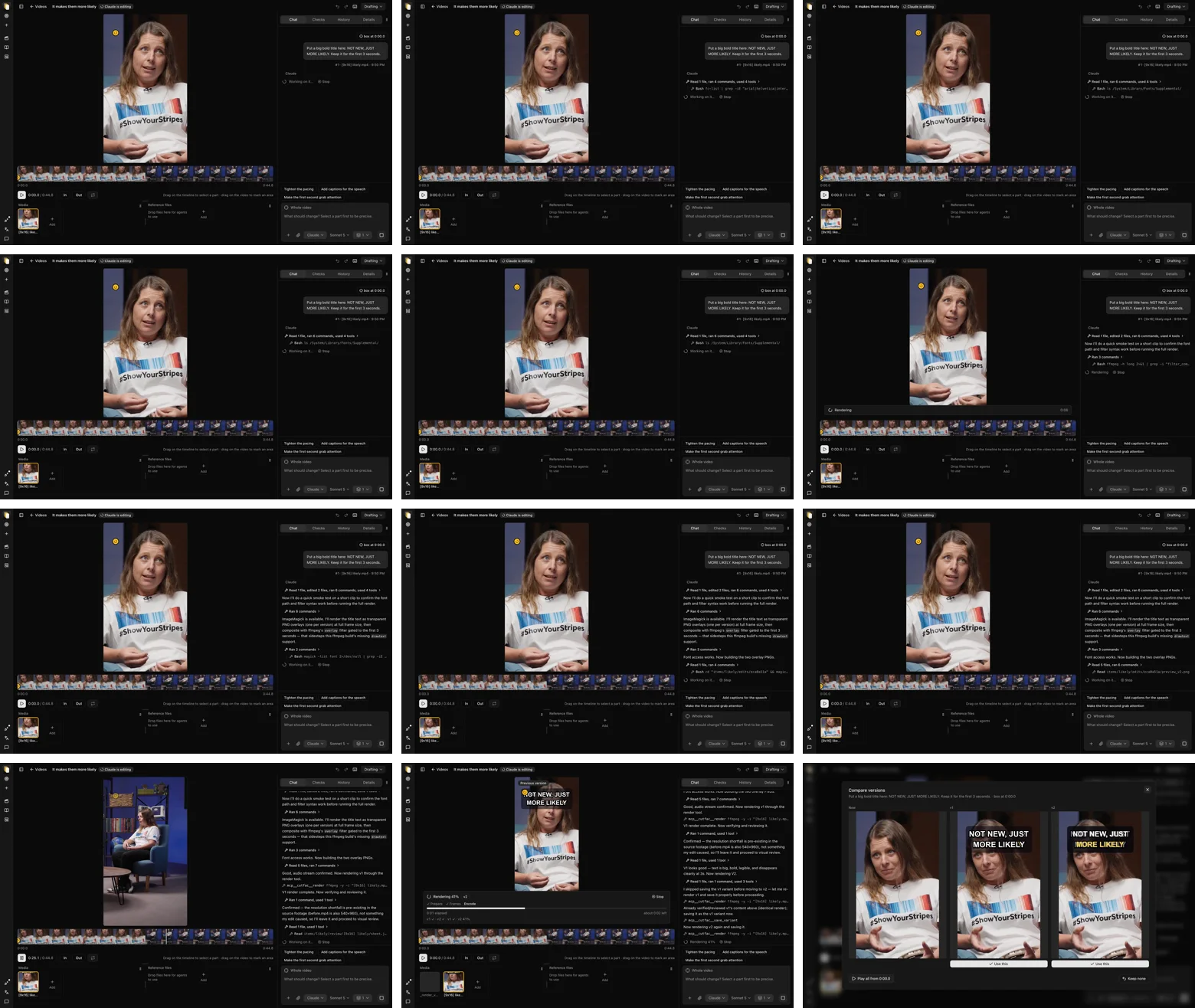
Almost all of the recording is waiting. The moments the promo needs are at the start, from 5.5 to 20.4 seconds, and at the end, from 398 seconds on. With those times, the plan is seven beats: a hook, the five steps, and an end card.
2. Make the captions
One short line per beat, set in a transparent strip the width of the Short:
F="/System/Library/Fonts/Supplemental/Arial Bold.ttf"cap() { magick -background none -fill white -font "$F" -pointsize "$3" -gravity center -size 960x caption:"$2" -extent 1080x400 "$1"; }cap hook.png "Edit a Short by pointing at it" 96cap step1.png "Draw a box on the video" 76cap step2.png "Say what should change" 76cap step3.png "Claude makes two versions" 76cap step4.png "Compare them side by side" 76cap step5.png "Keep the one you like" 76magick -size 1080x1920 xc:"#0b0b0c" -font "$F" -fill white -gravity center \ -pointsize 150 -annotate +0-120 "Cutfac" \ -pointsize 52 -fill "#b8b8bd" -annotate +0+40 "Make Shorts with Claude Code" \ -pointsize 64 -fill "#ffc83d" -annotate +0+200 "cutfac.com" end.pngcaption: wraps the text to fit -size 960x, 960 pixels wide, and -gravity center, which has to come before it, centers each line. -extent 1080x400 puts it in a 1080 × 400 strip with transparent edges, so it lands in the same place on every beat. The hook is bigger, 96 points against 76. The last command draws the end card: the name, one line on what it does, and the web address in yellow. All eight images took 0.39 seconds.
3. Crop each step
Most beats are the same recipe: cut a stretch of the recording, crop the part that matters, make it 1080 wide, change the speed, and lay it and its caption on a dark 1080 × 1920 background. Claude Code wrote it once as a shell function:
# seg OUT START END CROP SPEED CAPTIONseg() { ffmpeg -v error -y -ss "$2" -to "$3" -i screen.mp4 -i "$6" -filter_complex " [0:v]crop=$4,scale=1080:-2,setpts=(PTS-STARTPTS)/$5,fps=30[m]; color=c=0x0b0b0c:s=1080x1920:r=30[bg]; [bg][m]overlay=0:520+(1080-h)/2:shortest=1[v]; [v][1:v]overlay=0:100,scale=out_range=tv,format=yuv420p" \ -c:v libx264 -crf 18 -an "$1"}COMPARE=1484:1210:1070:310seg s2.mp4 9.8 16.6 820:560:2050:1380 2 step2.pngseg s3.mp4 20.4 394 840:840:2040:200 110 step3.pngseg s4.mp4 400.8 406.5 $COMPARE 1.3 step4.pngseg s5.mp4 406.5 409.7 820:560:2050:1240 1 step5.png-ss and -to before -i pick the stretch. crop=W:H:X:Y cuts a W × H part whose top left is at X, Y, and scale=1080:-2 makes it 1080 wide. setpts=(PTS-STARTPTS)/2 plays it twice as fast; fps=30 drops the frames that leaves over. color= makes the background, the first overlay puts the crop in the middle of a band from 520 pixels down, and the second puts the caption 100 pixels from the top. scale=out_range=tv turns the full-range color into the range ordinary video uses, so every part matches.
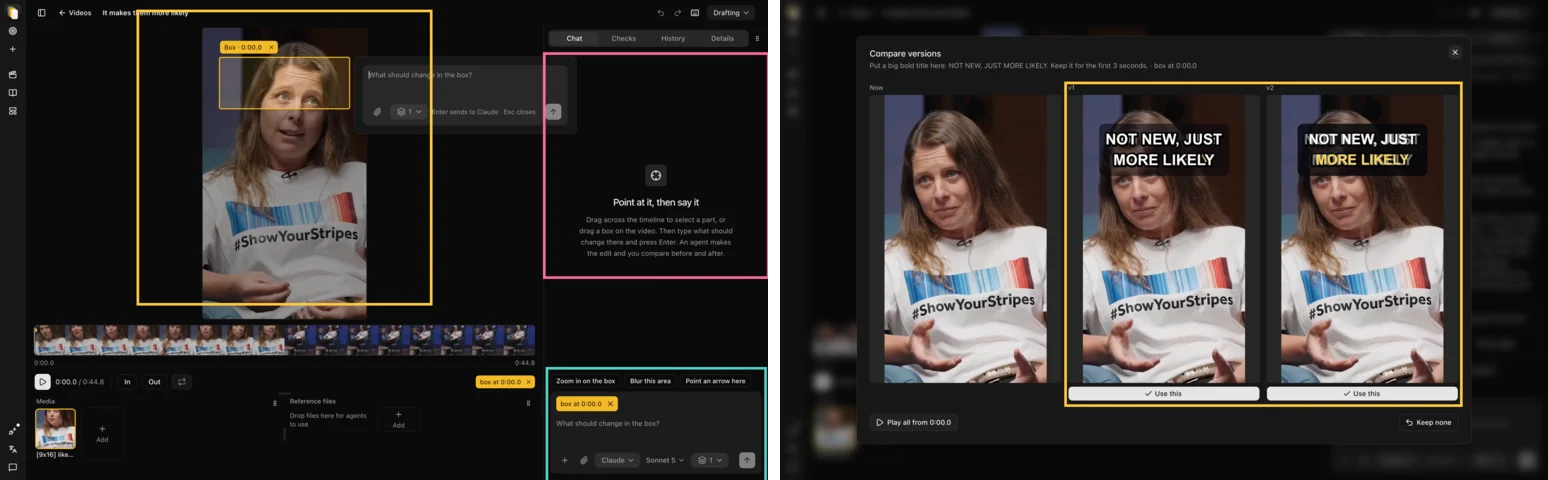
Typing the request, 9.8 to 16.6 seconds, plays at twice the speed. The agent's 6 minutes, 20.4 to 394 seconds, plays at 110 times, so 373.6 seconds become 3.4 and the chat visibly fills up. Comparing the versions plays at 1.3 times, and keeping one as it happened.
4. Zoom in on the box
The first step starts on the whole video and moves in on the box as it's drawn, so a viewer sees where it is and then what it says:
ffmpeg -v error -y -ss 5.5 -to 9.8 -i screen.mp4 -i step1.png -filter_complex " [0:v]crop=1800:1800:168:0, zoompan=z='1+0.636*min(on/45,1)':x='349*min(on/45,1)':y='40*min(on/45,1)':d=1:s=1080x1080:fps=30[m]; color=c=0x0b0b0c:s=1080x1920:r=30[bg]; [bg][m]overlay=0:520:shortest=1[v]; [v][1:v]overlay=0:100,scale=out_range=tv,format=yuv420p" -c:v libx264 -crf 18 -an s1.mp4crop=1800:1800:168:0 takes a square around the video. zoompan then shows a part of that square each frame: z is how far in, from 1 to 1.636 over the first 45 frames, a second and a half, and x and y move the top left of the view to 349, 40 over the same frames. min(on/45,1) is what stops it there, since on counts the frames. d=1 makes one frame out for each frame in, and s=1080x1080 is the size out.
5. Open on the result
A promo that starts with the empty app loses people before anything happens, so the first two seconds show how it ends: the two titled versions, under the main line.
ffmpeg -v error -y -ss 402.5 -i screen.mp4 -i hook.png -filter_complex " [0:v]trim=end_frame=1,crop=$COMPARE,scale=1080:-2,loop=59:1:0,setpts=N/30/TB[m]; color=c=0x0b0b0c:s=1080x1920:r=30:d=2[bg]; [bg][m]overlay=0:520+(1080-h)/2[v]; [v][1:v]overlay=0:100,scale=out_range=tv,format=yuv420p" -c:v libx264 -crf 18 -an s0.mp4trim=end_frame=1 keeps one frame from 402.5 seconds, loop=59:1:0 repeats it 59 more times, and setpts=N/30/TB numbers the 60 frames at 30 a second: 2 seconds. d=2 on the background ends it there too. The end card is the image from step 2 held for 2.5 seconds:
ffmpeg -v error -y -loop 1 -framerate 30 -t 2.5 -i end.png -vf format=yuv420p -c:v libx264 -crf 18 s6.mp46. Join and check
All seven parts have the same size, frame rate and color, so they join without encoding again:
printf "file '%s'\n" s0.mp4 s1.mp4 s2.mp4 s3.mp4 s4.mp4 s5.mp4 s6.mp4 > parts.txtffmpeg -v error -y -f concat -i parts.txt -f lavfi -i anullsrc=r=48000:cl=stereo \ -c:v copy -c:a aac -shortest -movflags +faststart promo.mp4There's no music, since there was no track we could license, so anullsrc adds a silent stereo track and -shortest stops it with the video; some apps take a file with no audio track badly. The whole script, all seven parts and the join, took 9.29 seconds. Then the check:
for f in s0 s1 s2 s3 s4 s5 s6; do printf "%s " $f.mp4; ffprobe -v error -show_entries format=duration -of csv=p=0 $f.mp4; doneffprobe -v error -show_entries stream=codec_name,width,height,r_frame_rate,nb_frames:format=duration -of compact=p=0 promo.mp4s0.mp4 2.000000 s1.mp4 4.300000 s2.mp4 3.400000 s3.mp4 3.400000 s4.mp4 4.400000 s5.mp4 3.200000 s6.mp4 2.500000 codec_name=h264|width=1080|height=1920|r_frame_rate=30/1|nb_frames=696 codec_name=aac|r_frame_rate=0/0|nb_frames=1088 duration=23.200000
23.2 seconds and 696 frames, which is 23.2 × 30. Before scale=out_range=tv was added, the parts from the recording came out full range and the end card didn't, and the join copied both as they were into one file. The probe of each part is what showed it.
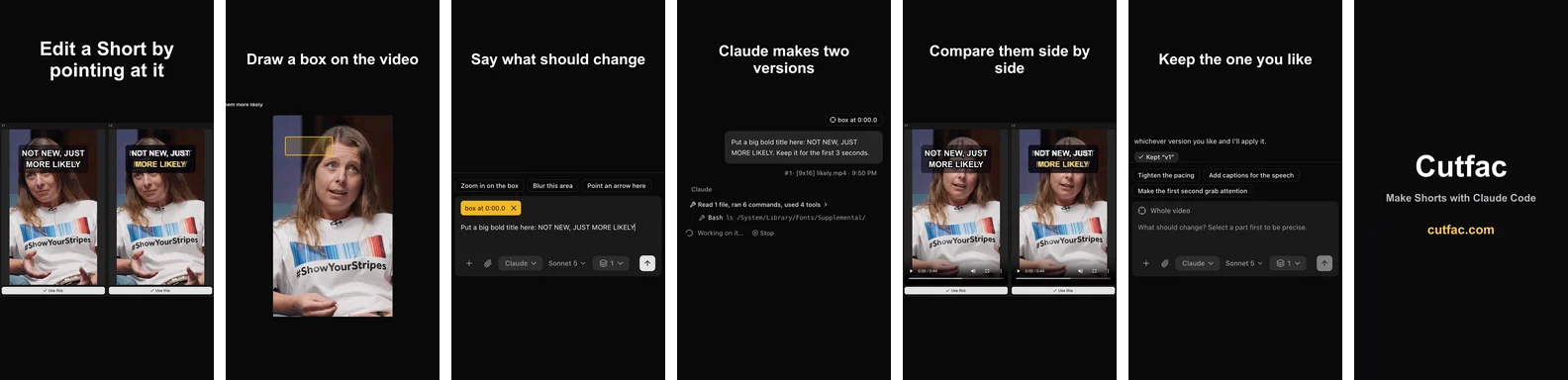
To change a beat, ask for that beat: a slower zoom, a different crop, a shorter wait. Each part is its own command, so only that one runs again before the join.
Where it gets hard
The commands ran in seconds. The slow part was choosing: which moments are the story, how close each crop should be to read on a phone, how fast the wait can go before it's a blur, and which of a few versions of a beat looks right. Each of those took looking at a frame, saying what to change, and comparing.
Cutfac is a Mac app we make for that part. It runs Claude Code or Codex for each video, lets you select a range or draw a box on the frame and say what to change, and keeps versions side by side to compare and pick from. You can do everything in this guide without it.
Sources
- Wikimedia Commons: Interview on extreme weather with physical geographer Hannah Cloke – The Royal Society (CC BY 3.0)
- Creative Commons: Attribution 3.0 Unported (CC BY 3.0)
- Claude Code overview
- Apple Support: How to record the screen on Mac
- Homebrew: ffmpeg
- Homebrew: imagemagick
- FFmpeg filters: crop, scale, setpts, fps, overlay, zoompan, loop, tile, color and anullsrc
- FFmpeg formats: concat
- ImageMagick examples: text to image (caption:)
- App Store Connect Help: App preview specifications
Questions
Record the app doing one task from start to finish, pick the few moments that tell it, crop each close enough to read on a phone, speed up the waiting, add a line of text per step and an end card with where to get the app. Claude Code can do all of it with ffmpeg and ImageMagick once you tell it which moments matter.
An app promo video, an app trailer and an app demo video usually mean the same thing: a short video that shows what the app does and where to get it, posted wherever you like. An App Store preview is a kind with Apple's own rules: 15 to 30 seconds, at most 30 frames a second, H.264 or ProRes 422 HQ, up to three per device size and language, and 886 × 1920 for recent iPhones. The 23-second, 30 fps promo here is within the length and frame rate.
YouTube Shorts can run up to 3 minutes, but a promo only needs as long as its steps take to read. This one is 23.2 seconds: a 2-second hook, five steps of 3 to 4.4 seconds, and a 2.5-second end card.
Press Shift-Command-5 and choose to record the whole screen or a part of it. The .mov it saves works with every command here; only the times and crop positions change.
For a still close-up, crop=W:H:X:Y then scale. For a zoom that moves in over time, zoompan with z, x and y written as expressions of on, the frame number, as in step 4.
Make the text as a transparent PNG with ImageMagick's caption:, then lay it over the video with ffmpeg's overlay filter, as in steps 2 and 3.
Cut it out with -ss and -to, then setpts=(PTS-STARTPTS)/N plays it N times as fast and fps=30 drops the frames left over. Here 373.6 seconds of waiting became 3.4 at 110 times.